 |
| ||||
 |
Home | Reviews | Speed Test | Tools | News | Forums | Info | About | Join |
|
After you have installed FAH 5 as a service , you may want to change the service name or add switches. Here is how: WARNING: The following steps require editing your registry, which can cause your PC to be damaged if not done properly. If that makes you nervous, stop now. Change Service Name 1) Open your registry editor by Clicking Start Menu>Run>Type regedit>Click OK 2) Navigate to this key: HKEY_LOCAL_MACHINE\SYSTEM\CurrentControlSet\Services\FAH@D:+Folding+FAH500-Console.exe 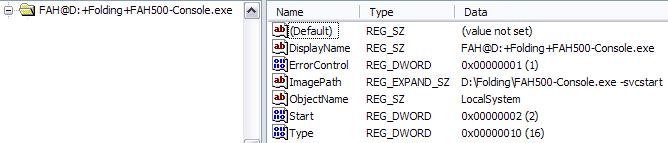 3) Double Click on the "DisplayName" key in the right column 4) Enter the new name of your choice in the value box then click OK 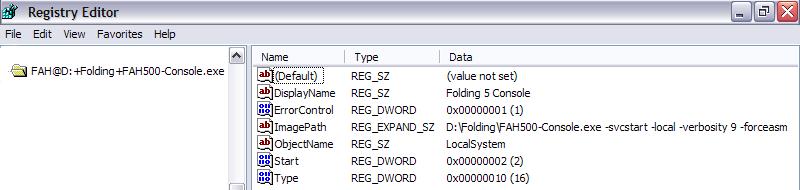 5) Close the registry editor, then reboot. Add Switches 1) Open your registry editor by Clicking Start Menu>Run>Type regedit>Click OK 2) Navigate to this key: HKEY_LOCAL_MACHINE\SYSTEM\CurrentControlSet\Services\FAH@D:+Folding+FAH500-Console.exe 3) Double Click on the "ImagePath" key in the right column 4) Enter your switches in the value box then click OK 5) Close the registry editor, then reboot. End of Registry Editing Make FAH 5 restart if it fails 1) Open the service configuration window by Clicking Start Menu>Control Panel>Performance and Maintenance>Administrative Tools>Services>Select the service and Double click it. 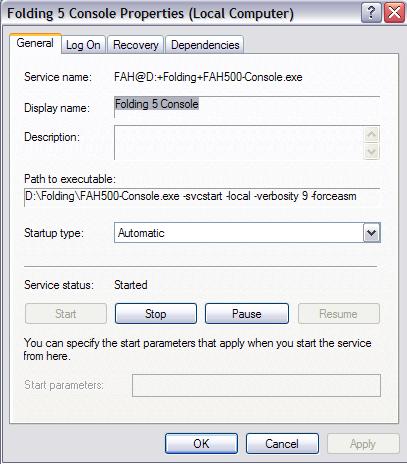 2) Click on the Recovery Tab 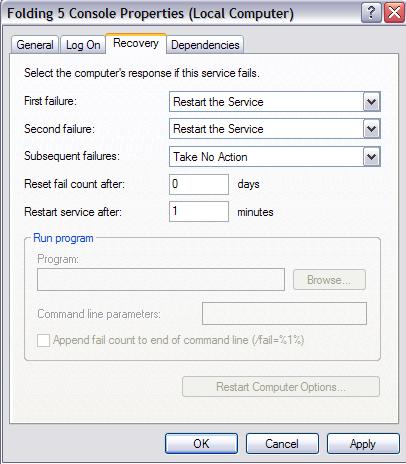 3) Make appropriate selections with the drop-downs 5) Close the service configuration window, then reboot.  got feedback? got feedback?by jazzman916 | ||||


- ISP Reviews
- Review an ISP
- Latest
- GBU
- Information
- Hardware
- FAQs
- Community
- Join
- Welcome
- Members
- For Sale
- Forums
- All Forums
- Follow

- Site
- Mobile mode

-
© DSLReports.com
Est. 1999
Wednesday, 17-Apr 03:22:08
Hosted by
Liquid Networks