 |
| ||||
 |
Home | Reviews | Speed Test | Tools | News | Forums | Info | About | Join |
|
The opposite of a "white list", a "black list" is obviously a place to include those specific email addresses you want to omit, or mark as spam. The format would be: somebody@someISP.com You can also use wildcards in your blacklist entries, for those spammers who include random numbers in their alleged email addresses:
Including an address in your Blacklist doesn't mean that you will no longer receive email from that address, just that the email received from that address will now be tagged as spam. You can make use of this by creating a rule in your email client. Go to the Mail Control from the top of the forum, then Settings, and click on the Anti-Spam Preferences. Check off "Re-write subject" in the mail handling panel, and leave the next box blank if you want to use the default. 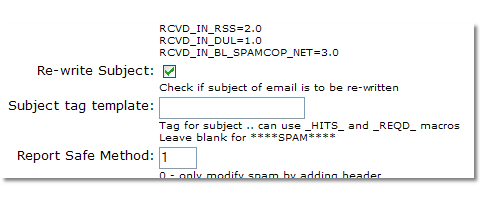 Now make a rule in your email client that if ****SPAM**** is found in the Subject line then the message will be moved to your spam folder, or your folder of choice. Now when you put an email address in your Blacklist, any email received from this address is tagged as spam and ends up in your spam folder.  got feedback? got feedback?by KeysCapt | |||||


- ISP Reviews
- Review an ISP
- Latest
- GBU
- Information
- Hardware
- FAQs
- Community
- Join
- Welcome
- Members
- For Sale
- Forums
- All Forums
- Follow

- Site
- Mobile mode

-
© DSLReports.com
Est. 1999
Wednesday, 17-Apr 01:55:26
Hosted by
Liquid Networks