 |
| ||||
 |
Home | Reviews | Speed Test | Tools | News | Forums | Info | About | Join |
|
This will give you Step By Step Instructions. The buttons you need to press are outlined in Red. First, open Ad-Aware. Click Check for Updates now. 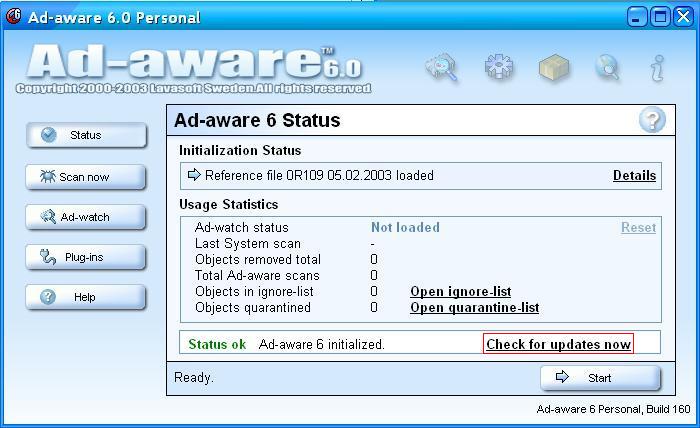 Then Click Connect. 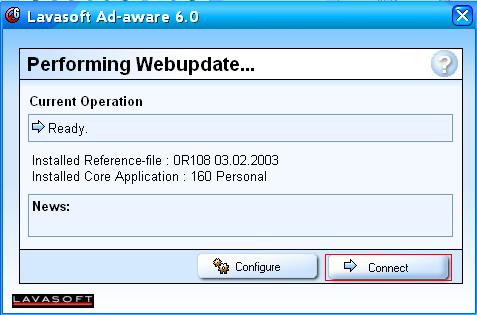 Press OK if it says new file available. 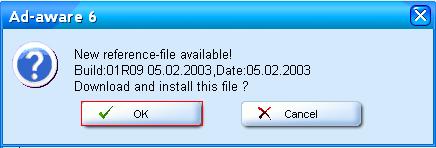 You are done when it says Webupdate Complete. 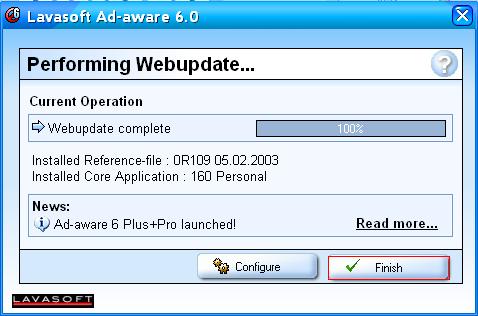 And also from any screen, you can click on "Open WebUpdate" icon (globe with magnifying glass).  got feedback? got feedback?by corster | ||||


- ISP Reviews
- Review an ISP
- Latest
- GBU
- Information
- Hardware
- FAQs
- Community
- Join
- Welcome
- Members
- For Sale
- Forums
- All Forums
- Follow

- Site
- Mobile mode

-
© DSLReports.com
Est. 1999
Tuesday, 16-Apr 20:58:02
Hosted by
Liquid Networks