 |
| ||||
 |
Home | Reviews | Speed Test | Tools | News | Forums | Info | About | Join |
3. Getting Started
Changes made to the mail server (Dec 2010) The new POP3 server will refuse plain text authentication unless you are using SSL. You will need to change your mail client to select APOP or MD5 Challenge/Response and/or select port 995/SSL pop username has to be username@domain "fred@dslr.net" not just "fred" password is your password authentication method is either APOP or MD5-CRAM port is 110 or 995 (with 'use SSL' checked) Successful setup using Thunderbird email client:  OR  Outlook Express:  Fetchmail: (By nwrickert  ) )Here's my ".fetchmailrc" entry skip dslr via mail.dslr.net proto apop user ********@dslr.net with pass "********" ssl is ******** here The "skip" means to not automatically use this entry. I use fetchmail dslr to specify it. Change "skip" to "poll" to have that mailbox automatically checked whenever fetchmail is run. by KeysCapt You may change your main name (base name if you will) by deleting it, then starting again. If you change your username on the site, nothing is changed in the mail system. You retain your originally chosen name and aliases. There is no way to migrate an existing pop mailbox with uncollected mail to a new name. You must delete and start again. Feedback received on this FAQ entry:
by KeysCapt Initially, your password for the DSLR Mail account is the same as your site password. However - Your password at DSLR is limited to 12 characters ... characters beyond that are ignored. For the POP server, just enter the first 12 characters of it, or change to a 12 character password on DSLR. Feedback received on this FAQ entry:
by KeysCapt If you change your site mail address to your @dslr.net address, you will find two new fields on your Members->Account page. These are "secret question" and "secret answer" as illustrated below. They will be used as a password recovery alternative. 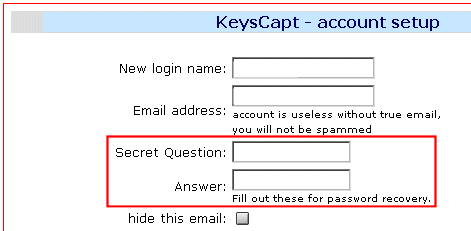 The secret question field length is very short right now, but that will be remedied later. Additionally, the password recovery process for those who fill these out is not functioning at this time, but will be completed later as well. by KeysCapt Go to the DSLR Mail page and follow the directions. Your registered DSLR/BBR user name has been reserved for your use as a mailbox. You must be a Premium member to access this feature. You will see the following screen, once you have agreed to the TOS: Here, you may elect to set your email account up as an alias, a POP3 account, for forwarding only, or an IMAP box (not available yet). 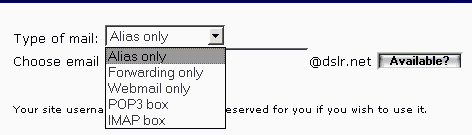 by KeysCapt | ||||


- ISP Reviews
- Review an ISP
- Latest
- GBU
- Information
- Hardware
- FAQs
- Community
- Join
- Welcome
- Members
- For Sale
- Forums
- All Forums
- Follow

- Site
- Mobile mode

-
© DSLReports.com
Est. 1999
Wednesday, 17-Apr 21:07:50
Hosted by
Liquid Networks